This is a very simple blog based on flask. Goal is to serve the page within the first TCP roundtrip (around 14kB).
- using absolutely minimal css framework
- inlining most of CSS and Javascript
- using system fonts stack
- reduce http requests where ever possible
The Blog will render all Markdown files in the "pages" subfolder like this: <URL>/<page>.
Rename the folder "pages-sample" to "pages". (Or symlink to a separately version controlled repository for the content.)
The Blog will render all Markdown files in the "projects" subfolder like this: <URL>/projects/<project>.
Rename the folder "projects-sample" to "projects". (Or symlink to a separately version controlled repository for the content.)
todo: <URL>/dashboards/<dashboard> - statistics for the current instance.
on Debian(based) Server, using nginx and Gunicorn
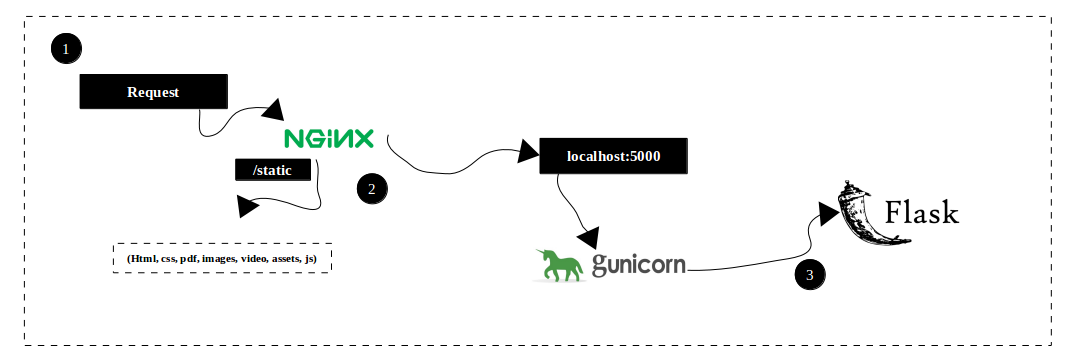
- python3
- python3-pip
- python3-venv
- python3-dev
- nginx
sudo apt-get install python3-pip python3-dev nginx
Website is served from here:
cd /var/www/
Clone the repository:
sudo git clone https://github.com/alexladda/instance-blog
Change owner
sudo chown -R $USER:$USER instance-blog
Create and activate virtual environment
python3 -m venv env
source env/bin/activate
Install instance-blog dependencies:
python -m pip install -r requirements.txt
(see cat requirements.txt for complete list of python dependencies)
Deploy to systemd:
doublecheck the paths and settings:
vim app.service
symlink said file from systemd folder:
sudo ln -s /var/www/instance-blog/app.service /etc/systemd/system/app.service
sudo systemctl start app
sudo systemctl enable app
(the file app.sock is created)
vim /etc/nginx/sites-available/instance-blog
server {

       server_name <your-url>;

       root /var/www/instance-blog;
       index index.html;

       location / {
                try_files $uri $uri/ =404;
                include proxy_params;
                proxy_pass http://unix:/var/www/instance-blog/app.sock;
       }
}
ln -s /etc/nginx/sites-available/instance-blog /etc/nginx/sites-enabled/instance-blog
test configuration:
sudo nginx -t
start / restart configuration:
sudo systemctl restart nginx