endless "Waiting for WinRM to become available" #101

Description

I have got a fresh Windows 10 x64 on my host machine.
First, I install dependencies in PowerShell.
Packer:
$releaseZipUrl = "https://releases.hashicorp.com/packer/1.1.0/packer_1.1.0_windows_amd64.zip?_ga=2.126128971.795379335.1507324222-290923388.1505150799"
$zipFile = "$env:TEMP\packer_1.1.0_windows_amd64.zip"
Start-BitsTransfer -Source $releaseZipUrl -Destination $zipFile
$targetFolder = "$env:ProgramFiles\Packer"
[System.Reflection.Assembly]::LoadWithPartialName( 'System.IO.Compression.FileSystem' ) | Out-Null
[System.IO.Compression.ZipFile]::ExtractToDirectory( $zipFile, "$targetFolder" )
$env:Path="$env:Path;$targetFolder"
[Environment]::SetEnvironmentVariable("Path", $env:Path, [EnvironmentVariableTarget]::Machine)
VirtualBox:
$releaseExeUrl = "http://download.virtualbox.org/virtualbox/5.1.28/VirtualBox-5.1.28-117968-Win.exe"
$exeFile = "$env:TEMP\VirtualBox-5.1.28-117968-Win.exe"
Start-BitsTransfer -Source $releaseExeUrl -Destination $exeFile
Start-Process $exeFile -Wait -ArgumentList "--silent"
Chef SDK:
$releaseMsiUrl = "https://packages.chef.io/files/stable/chefdk/2.3.4/windows/2012r2/chefdk-2.3.4-1-x64.msi"
$msiFile = "$env:TEMP\chefdk-2.3.4-1-x64.msi"
Start-BitsTransfer -Source $releaseMsiUrl -Destination $msiFile
Start-Process msiexec.exe -Wait -ArgumentList "/I $msiFile /quiet"
Git:
$releaseExeUrl = "https://github.com/git-for-windows/git/releases/download/v2.14.2.windows.2/Git-2.14.2.2-64-bit.exe"
$exeFile = "$env:TEMP\Git-2.14.2.2-64-bit.exe"
Invoke-RestMethod -Uri $releaseExeUrl -OutFile $exeFile
Start-Process $exeFile -Wait -ArgumentList "/SILENT"
Then I open a new cmd window to clone and run the project:
cd \
md projects
cd projects
md projects-packer-templates
cd projects-packer-templates
git clone https://github.com/mwrock/packer-templates.git c:\projects\projects-packer-templates
cd cookbooks/packer-templates
berks vendor ../../vendor/cookbooks
cd ..\..
packer build -force -only virtualbox-iso .\vbox-2012r2.json
As a result, it endeavors on following stage:
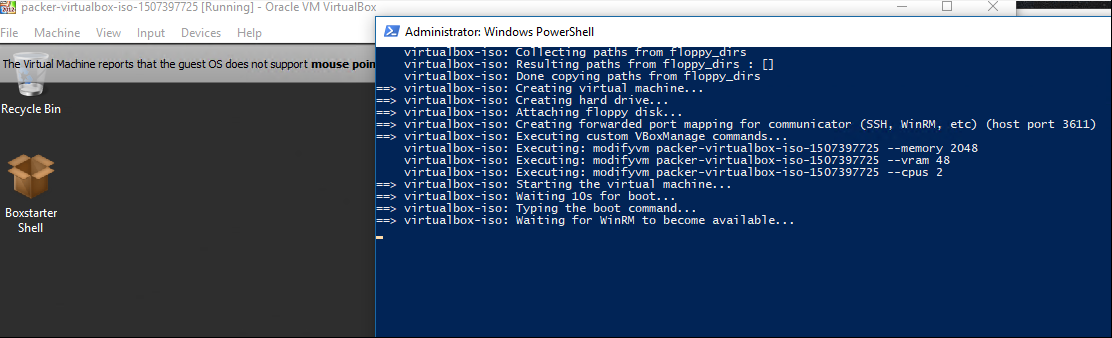
So it opens the virtual machine but never continues provisioning.