



Transform your Go code into beautiful, interactive documentation with diagrams, cross-references, and rich formatting.
goasciidoc generates nice AsciiDoc documentation directly from your Go code, with so you may include:
- 🎨 Rich Diagrams - Embed sequence diagrams, UML, flowcharts, and more directly in your code comments
- 🔗 Smart Linking - Automatic cross-references between types, both internal and external (to pkg.go.dev)
- 📝 Auto-Linked Documentation - Backtick references in comments automatically become clickable links
- 📊 Visual Examples - Render structs as JSON/YAML examples automatically
- ✨ Syntax Highlighting - Code highlighting with clickable type references
- 🏗️ Multi-Module Support - Full Go workspace support with flexible documentation generation
- 📦 Package-Level Splitting - Generate separate documentation files per package
- 🎯 Flexible Templates - Customize every aspect of your documentation output
(see asciidoc markup guide)
# Install
go install github.com/mariotoffia/goasciidoc@latest

# Generate documentation
goasciidoc -o docs.adoc --type-links external --highlighter goasciidoc
That's it! You now have documentation with clickable type links and syntax highlighting.
Asciidoc do support many plugins to e.g. render sequence diagrams, svg images, ERD, BPMN, RackDiag and many more.
💡 See the plugins section below for examples on kroki rendered images
To generate documentation for this project as mydoc.adoc, do the following:
goasciidoc -o mydoc.adoc --type-links external --highlighter goasciidoc --render struct-jsonThe above will generate standard code documentation, internal and test is excluded. By default it renders a index with some defaults including a table of contents.
It also resolves both internal and external type references and make clickable asciidoc links to those types. When highlighter is set to goasciidoc even the function signatures are nicely highlighted with links to referenced types (otherwise those are standar source, go blocks with no links).
Need to skip generated or scratch folders? Add one or more --exclude filters. Use regexes or the glb: shorthand, e.g. --exclude 'glb:**/.temp-files/**' (glb: tries to translate glob expression to regex).
It also will render structs as JSON (example) when --render struct-json is set. Supported renderers are:
struct-json: Renders structs as JSONstruct-yaml: Renders structs as YAML
Both may be enabled at the same time.
Is is possible to override the contents by supplying a JSON string with overrides.
You may have more properties in the -c (configuration) parameter, for example:
 {
  "author": "Mario Toffia",
  "email": "[email protected]",
  "web": "https://github.com/mariotoffia/goasciidoc",
  "images": "../meta/assets",
  "title": "Go Asciidoc Document Generator",
  "toc": "Table of Contents",
  "toclevel": 2
}
💡 You can now generate links to referenced types both internal and external (to pkg.go.dev) using the --type-links switch. See Linking Referenced Types for more information. Use the highlighter goasciidoc to get nice highlighted code function signatures with links.
Everything is rendered using go templates and it is possible to override each of them using the -t switch (or if in same folder using --templatedir switch). Take a look at defaults/*.gtpl to view how such may look like. It is standard go templates.
All code is parsed thus you may annotate with asciidoc wherever you want, e.g.
// HealthChecker is responsible for doing various health checks on patients.
//
// Its main flow is conceptualized on following sequence diagram
//
// [mermaid,config-override,svg]
// ....
// sequenceDiagram
//    participant Alice
//    participant Bob
//    Alice->John: Hello John, how are you?
//    loop Healthcheck
//        John->John: Fight against hypochondria
//    end
//    Note right of John: Rational thoughts prevail...
//    John-->Alice: Great!
//    John->Bob: How about you?
//    Bob-->John: Jolly good!
// ....
type HealthChecker struct {

}This installs the latest version. Use the repository tags to determine the version you want to install (if not latest).
go install github.com/mariotoffia/goasciidoc@latestYou may now use the goasciidoc e.g. in the goasciidoc repo by goasciidoc --stdout. This will emit this project documentation onto the stdout. Add --debug to trace parser and renderer progress directly on stdout—handy when a run feels stuck. If you need help on flags and parameters just do a goasciidoc --h.
goasciidoc v0.6.0
Usage: goasciidoc [--out PATH] [--stdout] [--debug] [--module PATH] [--internal] [--private] [--nonexported] [--test] [--noindex] [--notoc] [--indexconfig JSON] [--overrides OVERRIDES] [--list-template] [--out-template OUT-TEMPLATE] [--packagedoc FILEPATH] [--templatedir TEMPLATEDIR] [--type-links MODE] [--sub-module MODE] [--package-mode MODE] [PATH [PATH ...]] --highlighter NAME

Positional arguments:
  PATH                   Directory or files to be included in scan (if none, current path is used)

Options:
  --out PATH, -o PATH    The out filepath to write the generated document, default module path, file docs.adoc
  --stdout               If output the generated asciidoc to stdout instead of file
  --debug                Outputs debug statements to stdout during processing
  --module PATH, -m PATH
                         an optional folder or file path to module, otherwise current directory
  --internal, -i         If internal go code shall be rendered as well
  --private, -p          If files beneath directories starting with an underscore shall be included
  --nonexported          Renders Non exported as well as the exported. Default only Exported is rendered.
  --test, -t             If test code should be included
  --noindex, -n          If no index header shall be generated
  --notoc                Removes the table of contents if index document
  --indexconfig JSON, -c JSON
                         JSON document to override the IndexConfig
  --overrides OVERRIDES, -r OVERRIDES
                         name=template filepath to override default templates
  --list-template        Lists all default templates in the binary
  --out-template OUT-TEMPLATE
                         outputs a template to stdout
  --packagedoc FILEPATH, -d FILEPATH
                         set relative package search filepaths for package documentation
  --templatedir TEMPLATEDIR
                         Loads template files *.gtpl from a directory, use --list to get valid names of templates
  --type-links MODE      Controls type reference linking: disabled, internal, or external (default disabled)
  --sub-module MODE      Submodule processing mode: none, single, or separate (default none)
  --package-mode MODE    Package-level rendering mode: none, include, or link (default none)
  --highlighter NAME     Source code highlighter to use; available: none, goasciidoc
  --help, -h             display this help and exit
--version display version and exitWhen generating documentation, goasciidoc can now render hyperlinks for referenced Go types. Enable it with --type-links internal to link across types within the current module, or --type-links external to also point at pkg.go.dev for external packages. By default (--type-links disabled) type names are rendered as plain text, preserving the behaviour of earlier releases.
goasciidoc automatically transforms backtick-enclosed identifiers in your documentation comments into clickable links! This works seamlessly with the --type-links flag to create rich, navigable documentation.
Simply wrap any type, function, method, or package name in backticks within your Go documentation comments, and goasciidoc will automatically:
- Detect the reference in your documentation
- Resolve it using your file's imports
- Generate the appropriate link (internal anchor or external pkg.go.dev)
Type References:
`MyType`- Links to type in current package`pkg.MyType`- Links to type from imported package`github.com/user/repo/pkg.MyType`- Fully qualified type reference
Method References:
`MyMethod`- Links to function in current package`Employee.GetName`- Links to method on receiver type`pkg.Service.Start`- Links to method from imported package
Function References:
`Resolve`- Links to function in current package`fmt.Println`- Links to external function (when using--type-links external)
Package References:
`fmt`- Links to package documentation`github.com/user/repo/pkg`- Links to specific package
package myapp

import (
    "fmt"
    "github.com/myorg/models"
)

// Employee represents an employee in the system.
// It provides methods for managing employee data.
type Employee struct {
    Name string
    ID   int
}

// GetName returns the employee's name.
// Use `fmt.Println` to display it.
func (e *Employee) GetName() string {
    return e.Name
}

// Person works in combination with the `Resolve` function to
// resolve the `Employee` type. It uses the `fmt` package to
// display information.
//
// The `Employee.GetName` method returns the employee name.
// You can also use the `models.Manager` type for hierarchical structures.
type Person struct {
    Employee Employee
    Age      int
}

// Resolve resolves a `Person` to an `Employee`.
// This function works with `fmt.Sprint` internally.
func Resolve(p *Person) *Employee {
    return &p.Employee
}
Generated Documentation Links:
When using --type-links internal-external, the above documentation generates:
`Resolve`→ Internal anchor link to the Resolve function`Employee`→ Internal anchor link to the Employee type`Employee.GetName`→ Internal anchor link to the GetName method`fmt`→ External link to https://pkg.go.dev/fmt`fmt.Println`→ External link to https://pkg.go.dev/fmt#Println`fmt.Sprint`→ External link to https://pkg.go.dev/fmt#Sprint`models.Manager`→ External link to https://pkg.go.dev/github.com/myorg/models#Manager
goasciidoc is smart about resolving references:
- Package vs Type:
`fmt`is recognized as a package,`Employee`as a type - Package vs Receiver:
`pkg.Method`checks imports;`Employee.GetName`checks current package types - Standard Library: Automatically recognized and linked to pkg.go.dev
Reference linking is automatically enabled when using type linking modes:
# Link both internal types and documentation references
goasciidoc --type-links internal --highlighter goasciidoc

# Link internal and external (recommended for comprehensive docs)
goasciidoc --type-links internal-external --highlighter goasciidoc
💡 Pro Tip: Combine with --highlighter goasciidoc for syntax-highlighted function signatures that also include clickable type links!
goasciidoc fully supports Go workspaces and multi-module projects! It automatically discovers go.work files or recursively finds multiple go.mod files, giving you flexible documentation generation options.
goasciidoc intelligently discovers your project structure:
- Walks up from the current directory (or
--modulepath) - Prefers
go.workovergo.modat each directory level - Auto-discovers all modules in your workspace
No configuration needed—it just works!
Control how multi-module documentation is generated with the --sub-module flag:
goasciidocOriginal behavior—documents a single module only. Backward compatible with all existing projects.
goasciidoc --sub-module=single -o docs.adocMerges all workspace modules into one unified document. Perfect for:
- Getting a complete overview of your workspace
- Creating comprehensive API documentation
- Generating a single file for distribution
Output: docs.adoc (contains all modules with clear section breaks)
goasciidoc --sub-module=separate -o api-docsGenerates separate documentation files for each module. Ideal for:
- Large workspaces with independent modules
- Modular documentation that can be distributed separately
- Projects where each module has distinct audiences
Output: api-docs-module1.adoc, api-docs-module2.adoc, etc.
When using --type-links internal with multi-module projects, types automatically reference each other:
# Single mode: Uses anchor links within the same document
goasciidoc --sub-module=single --type-links=internal

# Separate mode: Uses file links between documents
goasciidoc --sub-module=separate --type-links=internal
Example: If module2 uses a type from module1:
- Single mode: Generates
<<module1-Service,Service>>(anchor link) - Separate mode: Generates
link:module1.adoc#module1-Service[Service](file link)
Example 1: Go Workspace
myproject/
├── go.work          ← Automatically discovered!
├── go.mod
├── main.go
└── modules/
    ├── moduleA/
    │   ├── go.mod
    │   └── service.go
    └── moduleB/
        ├── go.mod
        └── handler.go
cd myproject
goasciidoc --sub-module=single -o workspace-docs.adoc
# Documents all 3 modules in one file
Example 2: Monorepo Without go.work
monorepo/
├── service-a/
│   └── go.mod
├── service-b/
│   └── go.mod
└── service-c/
    └── go.mod
cd monorepo
goasciidoc --sub-module=separate -o services
# Generates: services-service-a.adoc, services-service-b.adoc, services-service-c.adoc
Example 3: Complete Multi-Module Documentation
# Generate comprehensive docs with all features enabled
goasciidoc \
  --sub-module=single \
  --type-links=internal \
  --highlighter=goasciidoc \
  --render struct-json \
  --render struct-yaml \
  -o complete-api-docs.adoc

# Result: Fully-linked documentation of your entire workspace!Each module section automatically includes:
- Module name (e.g.,
github.com/myorg/myproject/moduleA) - Go version requirement
- Location on the filesystem
This makes it easy to understand the structure of complex workspaces.
goasciidoc can generate separate documentation files for each package, creating a modular, navigable documentation structure. This is perfect for large projects where you want each package to have its own standalone documentation file.
Control package-level documentation with the --package-mode flag:
goasciidocStandard behavior—generates a single documentation file with all packages inline. Compatible with existing workflows.
goasciidoc --package-mode=include -o docs/index.adocCreates separate files for each package with a master index that uses AsciiDoc include:: directives. Perfect for:
- Large projects with many packages
- Modular documentation that's easy to navigate
- Build systems that process includes at render time
Output:
docs/
├── index.adoc                           # Master index with includes
└── packages/
    ├── github.com_myorg_project.adoc
    ├── github.com_myorg_project_api.adoc
    ├── github.com_myorg_project_models.adoc
    └── github.com_myorg_project_utils.adoc
Master index uses include directives:
= My Project - Package Documentation
include::packages/github.com_myorg_project.adoc[]
include::packages/github.com_myorg_project_api.adoc[]goasciidoc --package-mode=link -o docs/index.adocCreates independent documentation files for each package with a master index that links to them. Ideal for:
- Documentation hosted on web servers
- Projects where packages should be viewable independently
- Static site generators that don't process includes
Output:
docs/
├── index.adoc                           # Master index with links
└── packages/
    ├── github.com_myorg_project.adoc         # Standalone document
    ├── github.com_myorg_project_api.adoc     # Standalone document
    ├── github.com_myorg_project_models.adoc  # Standalone document
    └── github.com_myorg_project_utils.adoc   # Standalone document
Master index uses links:
= My Project - Package Documentation

== Package: github.com/myorg/project
link:packages/github.com_myorg_project.adoc[View full documentation]

== Package: github.com/myorg/project/api
link:packages/github.com_myorg_project_api.adoc[View full documentation]Each package file is self-sufficient with:
- Document header with title, TOC, and metadata
- Level 1 heading for the package name
- Complete package contents (imports, types, functions, etc.)
- Package references section showing dependencies
Package References Section Example:
== Package References

=== Internal Packages
This package references the following packages within this project:

* <<pkg-2,github.com/myorg/project/models>> - link:models.adoc[Documentation]
* <<pkg-3,github.com/myorg/project/utils>> - link:utils.adoc[Documentation]

=== External Packages
This package imports the following external packages:

* `github.com/gin-gonic/gin`
* `github.com/spf13/cobra`You can combine package-level and module-level rendering:
# Separate files per package across multiple modules
goasciidoc --sub-module=single --package-mode=include -o docs/api.adoc
This creates package-level documentation for all packages across all modules in your workspace!
# Complete package-level documentation with all features
goasciidoc \
  --package-mode=include \
  --type-links=internal \
  --highlighter=goasciidoc \
  --render struct-json \
  -o docs/api-index.adoc

# Result:
# - docs/api-index.adoc (master index)
# - docs/packages/*.adoc (one file per package)
# - Cross-referenced types between packages
# - Syntax highlighting
# - JSON struct examplesBy default goasciidoc will use overview.adoc or _design/overview.adoc to generate the package overview. If those are not found, it will default back to the golang package documentation (if any).
It is possible to set other search paths for those document. The search-path is relative the package path.
NOTE: That the path is a relative filepath i.e both directory and file. Directory may be omitted.
For example, look for package-overview.adoc in package folder instead of the default overview.adoc, _design/overview.adoc:
goasciidoc --stdout -d package-overview.adoc There are a initial support for macros in goasciidoc, for example ${gad:current:fq} is supported and will substitute the macro to the current fully qualified path to the source file. This can be e.g. used for inclusions of source code.
Example Documentation
// ParseConfig to use when invoking ParseAny, ParseSingleFileWalker, and
// ParseSinglePackageWalker.
//
// .ParserConfig
// [source,go]
// ----
// include::${gad:current:fq}[tag=parse-config,indent=0]
// ----
// <1> These are usually excluded since many testcases is not documented anyhow
// <2> As of _go 1.16_ it is recommended to *only* use module based parsing
// tag::parse-config[]
type ParseConfig struct {
	// Test denotes if test files (ending with _test.go) should be included or not
	// (default not included)
	Test bool // <1>
	// Internal determines if internal folders are included or not (default not)
	Internal bool
	// UnderScore, when set to true it will include directories beginning with _
	UnderScore bool
	// Optional module to resolve fully qualified package paths
	Module *GoModule // <2>
}

// end::parse-config[]
It will then get rendered as follows:

| Macro | Description |
|---|---|
| ${gad:current:fq} | The fully qualified path to file being processed. |
| ${gad:current:fqdir} | The fully qualified path to folder being processed. |
| ${gad:current:dir} | The directory name where being processed. |
| ${gad:current:file} | The file name where being processed. |
This project consists of a parser to parse go-code and a producer to produce asciidoc files from the code & code documentation. It bases its rendering system heavily on templates (asciidoc/template.go) with some "sane" default so it may be rather easily overridden. The default templates is embedded in the binary from the defaults/*.gtpl files.
To list the default templates just do goasciidoc --list-template. Version 0.4.0 will list the following template names:
- interfaces
- interface
- consts
- typedeffunc
- package
- import
- typedefvars
- vars
- index
- function
- typedeffuncs
- functions
- structs
- struct
- typedefvars
- var
- const
- receivers
It is possible to retrieve the default templates (use list to get the template names) using a command switch --out-template NAME, for example:
goasciidoc --out-template structThe above outputs (for v0.0.6):
"=== {{.Struct.Name}}
[source, go]
----
{{.Struct.Decl}} {
{{- range .Struct.Fields}}
        {{if .AnonymousStruct}}{{.AnonymousStruct.Name}}{{"\t"}}struct{{else}}{{tabify .Decl}}{{end}}
{{- end}}
}
----

{{.Struct.Doc}}
{{range .Struct.Fields}}{{if not .AnonymousStruct}}
==== {{.Decl}}
{{.Doc}}
{{- end}}
{{end}}
{{range .Struct.Fields}}{{if .AnonymousStruct}}{{render $ .AnonymousStruct}}{{end}}{{end}}
"
If you're unhappy with one of the default templates, you may override it (one or more) using the -t FILEPATH switch. It may be several -t on same command if multiple overrides. The filepath is either relative or fully qualified filepath to a template file.
For example, overriding the package template can be done like this:
echo "== Override Package {{.File.FqPackage}}" > t.txt; goasciidoc -r package=t.txt --stdout; rm t.txtIn the stdout you may observe, now, it has Override Package instead of Package as heading
== Override Package github.com/mariotoffia/goasciidoc/goparser
=== Imports
...
It is possible to set a template directory where goasciidoc will search for files named (see list templates) and file extension .gtpl e.g. import.gtpl.
Example usage: goasciidoc --templatedir defaults
It reads all files and overrides those found, the rest is using the default. You can checkout the defaults folder (or copy as starting point) when you make your own layout. You can remove those not needed, and the defaults will kick in.
ls -l defaults
total 72
-rw-r--r-- 1 martoffi martoffi 104 Mar 19 21:33 const.gtpl
-rw-r--r-- 1 martoffi martoffi 256 Mar 19 21:33 consts.gtpl
-rw-r--r-- 1 martoffi martoffi 208 Mar 19 21:25 function.gtpl
-rw-r--r-- 1 martoffi martoffi 142 Mar 19 21:25 functions.gtpl
-rw-r--r-- 1 martoffi martoffi 159 Mar 19 21:33 import.gtpl
-rw-r--r-- 1 martoffi martoffi 623 Mar 19 21:24 index.gtpl
-rw-r--r-- 1 martoffi martoffi 307 Mar 19 21:26 interface.gtpl
-rw-r--r-- 1 martoffi martoffi 111 Mar 19 21:26 interfaces.gtpl
-rw-r--r-- 1 martoffi martoffi 220 Mar 19 21:24 package.gtpl
-rw-r--r-- 1 martoffi martoffi 148 Mar 19 21:27 receivers.gtpl
-rw-r--r-- 1 martoffi martoffi 562 Mar 19 21:26 struct.gtpl
-rw-r--r-- 1 martoffi martoffi 105 Mar 19 21:27 structs.gtpl
-rw-r--r-- 1 martoffi martoffi  92 Mar 19 21:32 typedeffunc.gtpl
-rw-r--r-- 1 martoffi martoffi 120 Mar 19 21:32 typedeffuncs.gtpl
-rw-r--r-- 1 martoffi martoffi 175 Mar 19 21:34 typedefvar.gtpl
-rw-r--r-- 1 martoffi martoffi 126 Mar 19 21:34 typedefvars.gtpl
-rw-r--r-- 1 martoffi martoffi 102 Mar 19 21:34 var.gtpl
-rw-r--r-- 1 martoffi martoffi 111 Mar 19 21:34 vars.gtplThe package goparser was taken from an open source project by zpatrick. It seemed abandoned so I've integrated it into this project (and extended it) and now it deviates rather much from it's earlier pure form ;). Many thanks @zpatrick!! That part has a MIT License.
copy.go is created by Roland Singer [[email protected]] and is used for unit test. Many thanks @r0l1. You may find the original here.
Since asciidoc supports plugins, thus is very versatile, myself is using kroki that may render many types of diagrams (can be done online or offline using docker-compose). Below there are just a few of many, many diagrams that may be outputted just using kroki.
For example a sequence diagram based on the following text in your documentation
sequenceDiagram
    participant Alice
    participant Bob
    Alice->John: Hello John, how are you?
    loop Healthcheck
        John->John: Fight against hypochondria
    end
    Note right of John: Rational thoughts prevail...
    John-->Alice: Great!
    John->Bob: How about you?
    Bob-->John: Jolly good!
will render the following sequence diagram
or are you into packet diagrams will the following text
packetdiag {
  colwidth = 32;
  node_height = 72;

  0-15: Source Port;
  16-31: Destination Port;
  32-63: Sequence Number;
  64-95: Acknowledgment Number;
  96-99: Data Offset;
  100-105: Reserved;
  106: URG [rotate = 270];
  107: ACK [rotate = 270];
  108: PSH [rotate = 270];
  109: RST [rotate = 270];
  110: SYN [rotate = 270];
  111: FIN [rotate = 270];
  112-127: Window;
  128-143: Checksum;
  144-159: Urgent Pointer;
  160-191: (Options and Padding);
  192-223: data [colheight = 3];
}
render the packet diagram image
Simple activity diagram can be annotated like this
actdiag {
  write -> convert -> image

  lane user {
    label = "User"
    write [label = "Writing reST"];
    image [label = "Get diagram IMAGE"];
  }
  lane actdiag {
    convert [label = "Convert reST to Image"];
  }
}
and outputs the following:
If you're into UML, you may use this annotation format
[Pirate|eyeCount: Int|raid();pillage()|
  [beard]--[parrot]
  [beard]-:>[foul mouth]
]

[<abstract>Marauder]<:--[Pirate]
[Pirate]- 0..7[mischief]
[jollyness]->[Pirate]
[jollyness]->[rum]
[jollyness]->[singing]
[Pirate]-> *[rum|tastiness: Int|swig()]
[Pirate]->[singing]
[singing]<->[rum]

[<start>st]->[<state>plunder]
[plunder]->[<choice>more loot]
[more loot]->[st]
[more loot] no ->[<end>e]

[<actor>Sailor] - [<usecase>shiver me;timbers]
to output this
You may also be a component fan
@startuml
!include C4_Container.puml

LAYOUT_TOP_DOWN
LAYOUT_WITH_LEGEND()

title Container diagram for Internet Banking System

Person(customer, Customer, "A customer of the bank, with personal bank accounts")

System_Boundary(c1, "Internet Banking") {
    Container(web_app, "Web Application", "Java, Spring MVC", "Delivers the static content and the Internet banking SPA")
    Container(spa, "Single-Page App", "JavaScript, Angular", "Provides all the Internet banking functionality to customers via their web browser")
    Container(mobile_app, "Mobile App", "C#, Xamarin", "Provides a limited subset of the Internet banking functionality to customers via their mobile device")
    ContainerDb(database, "Database", "SQL Database", "Stores user registration information, hashed auth credentials, access logs, etc.")
    Container(backend_api, "API Application", "Java, Docker Container", "Provides Internet banking functionality via API")
}

System_Ext(email_system, "E-Mail System", "The internal Microsoft Exchange system")
System_Ext(banking_system, "Mainframe Banking System", "Stores all of the core banking information about customers, accounts, transactions, etc.")

Rel(customer, web_app, "Uses", "HTTPS")
Rel(customer, spa, "Uses", "HTTPS")
Rel(customer, mobile_app, "Uses")

Rel_Neighbor(web_app, spa, "Delivers")
Rel(spa, backend_api, "Uses", "async, JSON/HTTPS")
Rel(mobile_app, backend_api, "Uses", "async, JSON/HTTPS")
Rel_Back_Neighbor(database, backend_api, "Reads from and writes to", "sync, JDBC")

Rel_Back(customer, email_system, "Sends e-mails to")
Rel_Back(email_system, backend_api, "Sends e-mails using", "sync, SMTP")
Rel_Neighbor(backend_api, banking_system, "Uses", "sync/async, XML/HTTPS")
@enduml
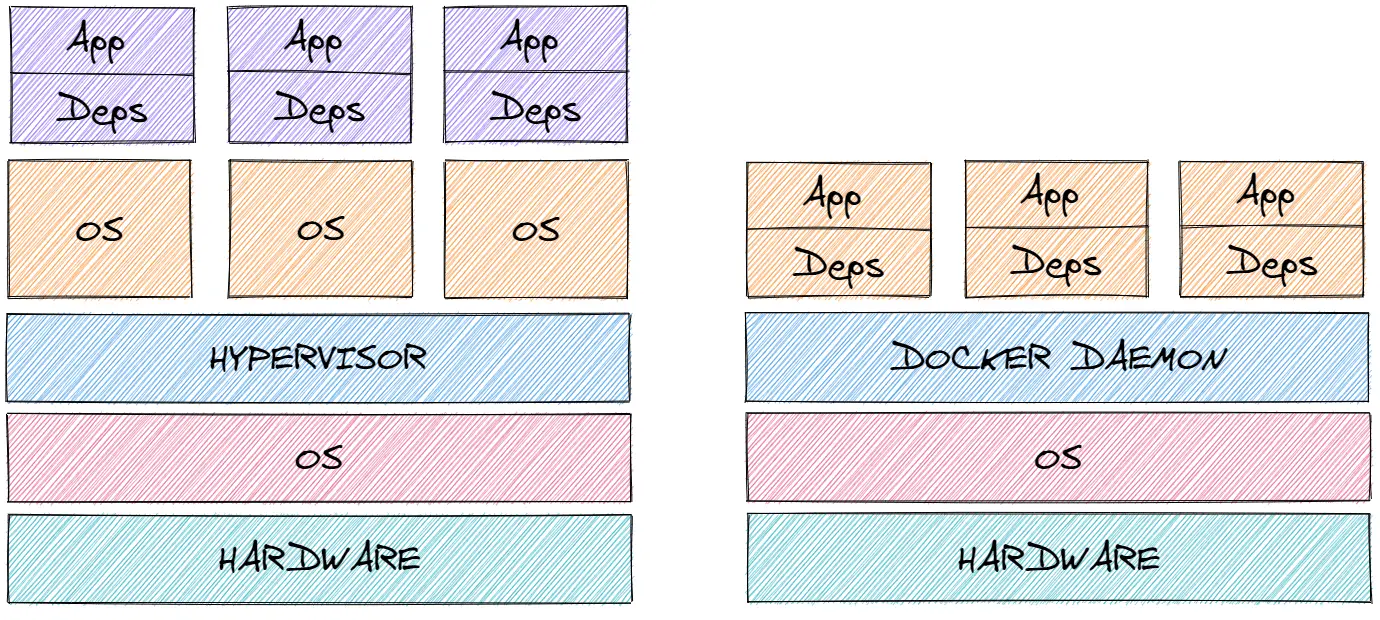
I use excalidraw.com diagrams a lot when documenting my code. They stored in a versionable JSON documents, that kroki can render natively. You may use them embedded in the comment or store the JSON document on filesystem and reference it (I use the latter).
It is even possible to generate a nice bar-chart like this (with some obscure JSON syntax ;)